
SIMPLE SHORTCUTS & SECRETS
Photo Editing Made Easy
For busy wedding & portrait photographers so you can close that laptop sooner.
2 Lightroom Pitfalls Wasting Your Time
When I really want something done…
I add it into my morning or night routine.
Like making sure my cat has fresh water each day—it's a morning must.
Or running the dishwasher at night—part of my evening wrap-up.
End result? Minnie, my cat, always has fresh water, and the dishes are spotless by morning. Gold star for me! 🌟
Just like routines help me knock out my daily to-dos, there are routines in Lightroom that make editing less work too.
But, be warned—Lightroom can be a bit picky about the exact way you do your editing steps.
Below are two sequences I’ve discovered where getting the steps just right makes all the difference.
Your Weekly Photo Editing Tip
Why does the sequence of your editing steps matter in Lightroom?
Sometimes, Lightroom might block a step if you go in the “wrong” sequence. In other cases, following the right sequence can prevent you from having to repeat tasks.
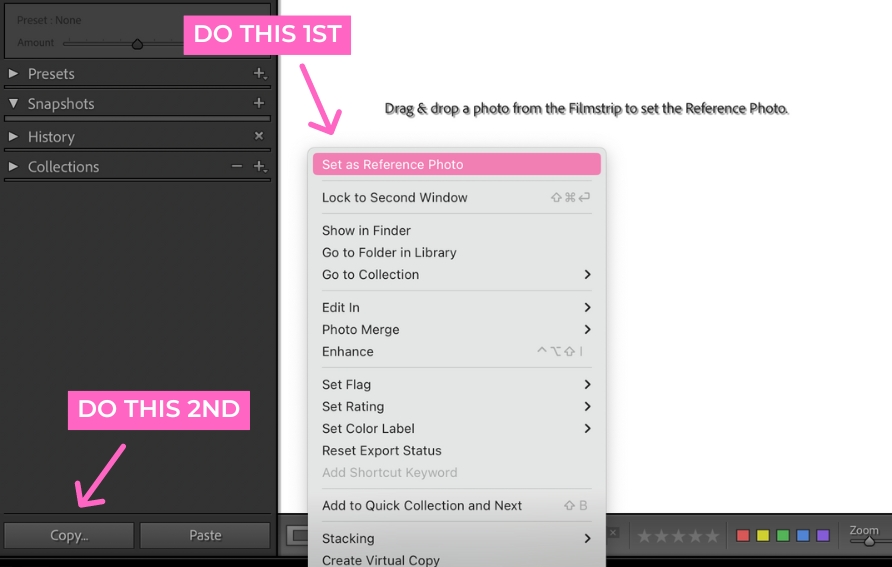
Set the Reference Image BEFORE Copying/Pasting
This is what I’ve noticed: If you copy settings from an image and then set your Reference Photo before pasting, Lightroom doesn’t paste the settings you copied.
🔑 Key takeaway: Set the Reference Photo first, then copy the settings you want to apply to another image.
Apply Healing/Remover Tool BEFORE Applying Masks
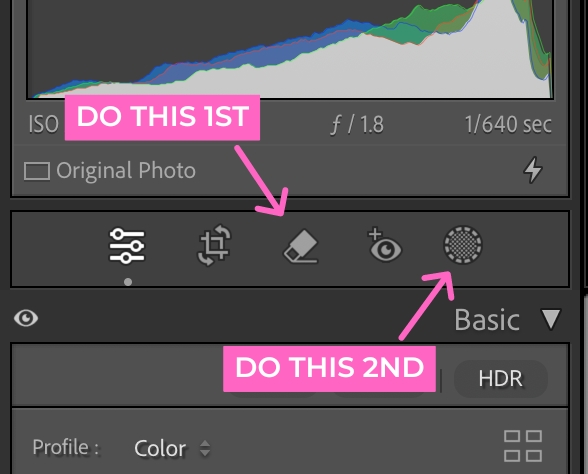
Ever notice that red dot under your Masking icon? It means your AI masks need updating.
I found that if I did any healing or removing after applying an AI mask (or two or three...), that red dot would appear. And if I had multiple masks, updating them all took a lot of time.
But when I used the healing/remover tool first and then applied masks, the AI masks didn’t need updating. Yay! Since I figured that out, I make sure to heal or use the remover tool before adding AI masks to skip that added step.
🔑 Key takeaway: Use the healing/remover tool first, then apply your AI masks.
Have you noticed this in Lightroom?
Happy editing,
Erika

Check Out the Newest Posts
Hey there photographer!

I'm Erika. I'm a private photo editor for wedding photographers and photo editing educator. Think of me as your techy friend who loves figuring out the shortcuts in Lightroom Classic so you don't have to.


Blog Categories


(Affiliate Code)


Online private photo editor based in Cleveland, Tennessee, serving wedding photographers worldwide.
Services
Color Correction
Style Matching
Lightroom Classic Retouching
Image Culling

Copyright © 2020-2026 Erika Swafford. All Rights Reserved
Created with Systeme.io