
SIMPLE SHORTCUTS & SECRETS
Photo Editing Made Easy
For busy wedding & portrait photographers so you can close that laptop sooner.
Editing Hack in the Library Grid
Note: This post includes an affiliate code from Power Keys that gives you a $10 discount if you decide to purchase an annual subscription. If you use the code, I may also receive a discount on my subscription at no extra cost to you.
With fall busy season burying most of us right now, I thought this one might be useful when you’re doing your final tweaks for a gallery.

Did you know you can edit from the Library Grid, not just the Develop module? Yes, you can!
There are limits to what you can do from the Library Grid which is why I just use this to tweak my edits at the end of editing the entire catalog from the Develop module, if appropriate.
So how do we do this?
Well, first be sure you are in the Library Grid, of course. Then cruise over to the right panel. Look for "Quick Develop" that should be listed right under the histogram.
Step 1:
Is the little triangle next to Quick Develop pointing down? If it is, it’s fully expanded. Yay! If the triangle is pointing to the left, tap on it to expand that section.
Step 2:
Expand all three sections below so the triangles for each one are pointing down/expanded. (Many of these are pointed to the left by default.)
Saved Preset
White Balance
Tone Control
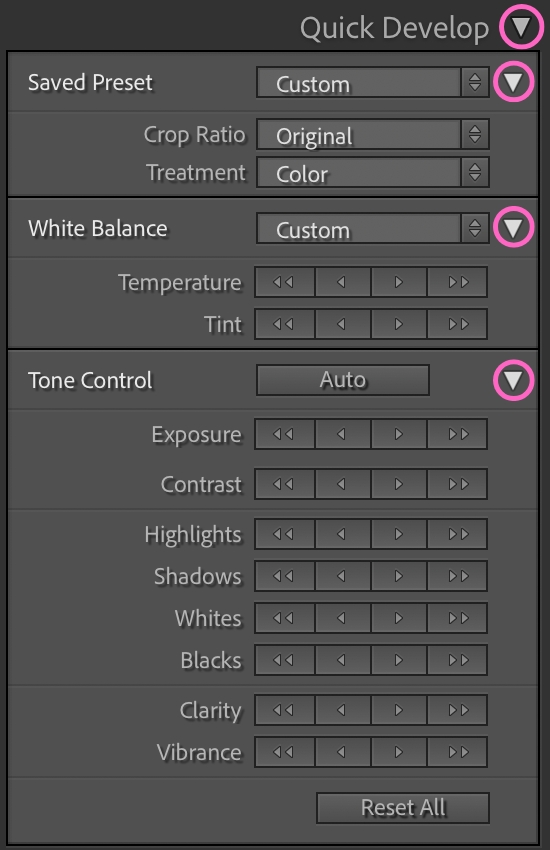
Step 3:
Notice all the controls you now have!
You can apply a preset from the Save Preset section.
You can adjust the white balance from either the pull down menu or the temperature and tint buttons. The one arrow button bumps it up or down a little and the buttons with two arrows bumps it up or down a lot.
You can adjust the exposure, contrast, etc., in the Tone Control. Same "little" or "a lot" buttons as with white balance.
👉🏻 And here’s another cool thing about using the Quick Develop—you can select multiple photos to adjust all at once and then use the Quick Develop controls to apply to all the photos selected!
Again, you are restricted by the amount buttons so it’s not always going to do what you want without jumping back into the Develop module. But for minor tweaks here and there, this can be a big help. So start tweaking! 😄

(Affiliate Code)
If you really want to work your ✨editing magic✨ from the Library Grid, try out the Power Keys app where you can make your own keyboard shortcuts.
They just added a feature where you can use your editing keyboard shortcuts from the Develop module in the Library Grid! Try it out at this link.
Happy editing,
Erika

Check Out the Newest Posts
Hey there photographer!

I'm Erika. I'm a private photo editor for wedding photographers and photo editing educator. Think of me as your techy friend who loves figuring out the shortcuts in Lightroom Classic so you don't have to.


Blog Categories


(Affiliate Code)


Online private photo editor based in Cleveland, Tennessee, serving wedding photographers worldwide.
Services
Color Correction
Style Matching
Lightroom Classic Retouching
Image Culling

Copyright © 2020-2026 Erika Swafford. All Rights Reserved
Created with Systeme.io