
SIMPLE SHORTCUTS & SECRETS
Photo Editing Made Easy
For busy wedding & portrait photographers so you can close that laptop sooner.
Hidden Toolbar Upgrade in Lightroom Classic
Still getting back in the normal swing of things after Thanksgiving so I’m sharing an oldie but a goodie tip from last year. This tip was one of my favorites and I still use it today.

Lightroom Classic is hiding things from you. I’m sorry you had to hear it from me…Well, I’m actually glad to tell you what’s hiding from you that might be useful to your workflow!
Lightroom has tiny, innocent looking arrows everywhere and if you don’t notice them, you might be missing out.
Upgrade Your Toolbar Instantly
Take the tiny arrow in the right-hand corner toolbar in the Develop module that’s right there under the image. (If you don’t see the toolbar, hit the T key on your keyboard.)
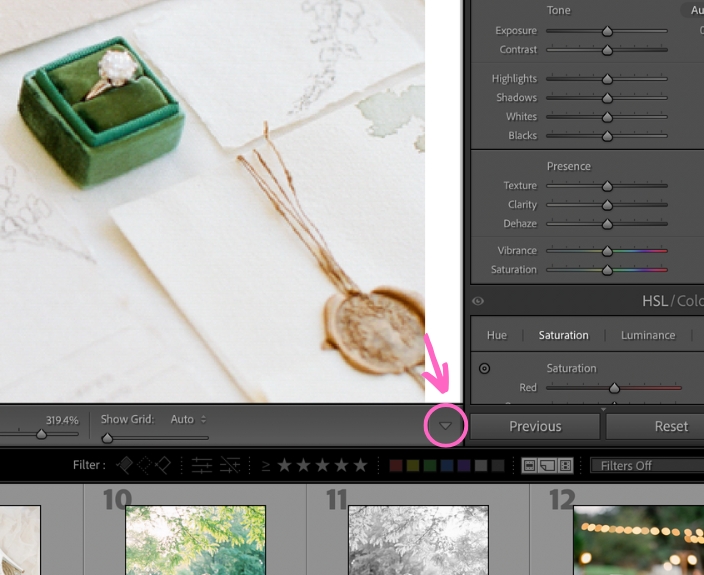
Click on that tiny arrow to see all the tools you could add to your toolbar!
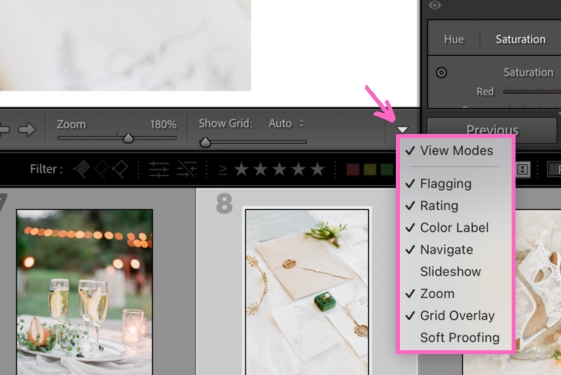
I’m excited about the Zoom slider and the Grid Overlay option. What will you add to your toolbar from this list?
Happy editing,
Erika

Check Out the Newest Posts
Hey there photographer!

I'm Erika. I'm a private photo editor for wedding photographers and photo editing educator. Think of me as your techy friend who loves figuring out the shortcuts in Lightroom Classic so you don't have to.


Blog Categories


(Affiliate Code)


Online private photo editor based in Cleveland, Tennessee, serving wedding photographers worldwide.
Services
Color Correction
Style Matching
Lightroom Classic Retouching
Image Culling

Copyright © 2020-2026 Erika Swafford. All Rights Reserved
Created with Systeme.io