
SIMPLE SHORTCUTS & SECRETS
Photo Editing Made Easy
For busy wedding & portrait photographers so you can close that laptop sooner.
How to Systemize Your Photo Editing
Before I tell you this story, let me just say that I have a purple bruise the size of my fist on my butt from this adventure. (And I didn’t notice the bruise until 3 days later.)
My mother is afraid of heights so when my brother and I wanted to hike to the peak of Fall Creek Falls during our family vacation a week ago, she held back at a certain point.
To reach the peak we had to climb down rocks and boulders. (Sounds backwards, I know.)
At one particular part of the trail I had to jump down which felt very much like falling while someone punched me hard in the butt with a rock.
Walk it off, right? And that’s what I did.
Ouch. 😣
Seeing the view from the peak was like seeing how hawks must see the world from the sky. Words fail me on how to describe it. Even the photos and videos I took don’t do it justice.
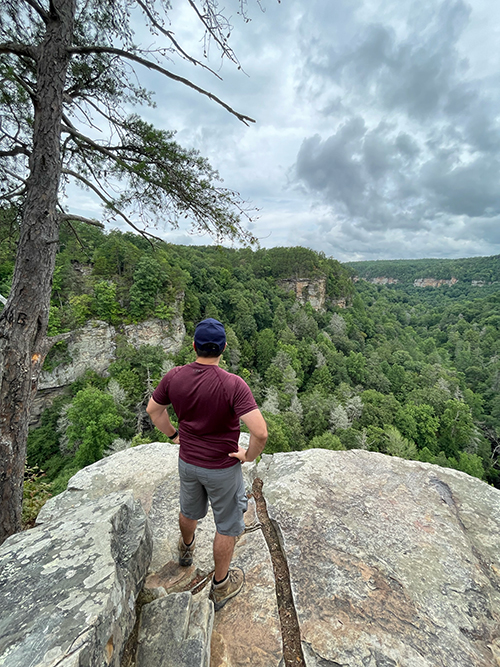
Also, totally worth the bodily injury. Especially since I didn’t notice the bruise until several days later.
So just like how I had to walk off the pain of climbing down to reach the peak at Fall Creek Falls and see that breath-taking view, sometimes we have to work through challenges in photo editing to build that editing muscle that can be hard at first.
But it pays off in the end when your editing is easier, faster and better! Let me explain in this week’s photo editing tip...
Your Weekly Photo Editing Tip
This is a technique you can use no matter what software program you’re using to edit your photos. (Although, I’m partial to Lightroom Classic, of course.)
This is what I invite you to do:
✨Systemize your editing steps.✨
What are editing steps?
That’s anything you do in Lightroom when you're editing like adjusting the exposure, white balance, cropping, etc. Each one of those is a step.
So then “systemizing your editing steps” means that I want you to memorize a routine of editing steps that you will do in the same sequence every time you edit.
Do it every time until you can do the steps without even thinking about it.
It’s kind of like brushing your teeth. You don’t really think about brushing each tooth like you did when you learned to do it as a kid. It’s second nature and you have sparkling white teeth at the end.
Same thing with editing. Develop that muscle memory (or just memory) to do the same steps in the same order.
Systemizing your editing steps truly streamlines your photo editing so you can do each step once and do it right the first time.
Also, if you do forget a step, you’ll “feel” it so you can correct it quickly.
Is it like feeling the force? Maybe. I guess that makes you and me Jedi’s, right?

Let me give you an example of what my systemized editing steps for an image look like:
Sync from anchor/reference image
Correct exposure if needed
Correct white balance if needed
Straighten and crop if needed
Healing as needed
Masking as needed
The sequence of the editing steps doesn’t matter so much as just getting into the habit of following the same steps nearly every time you edit a photo. That is key to memorizing your systemized editing steps.
When Not to Use this System
Okay, you might be thinking, “This sounds cool but how does this work with the creative process of editing?”
I’m so glad you asked.
You might not be able to do this when you’re establishing the initial editing style of a photo session because you’re in the creative process of exploring the look and feeling you want.
I totally understand that. The editing steps are less structured with that particular process. (Although, maybe a checklist would help make sure you remember everything?)
But once you have the look you want for the session figured out, you can then use the systemized editing steps to quickly edit the rest of the images to match your creative vision. And it will go a ton faster!
👉🏻 Pro Tip:
If you want to prevent the “evil” red dot showing up on your masks icon in the toolbar in Lightroom Classic, be sure to do any healing/removing BEFORE you do the masking.
If you don’t, Lightroom will put that red dot there to update your masks. (So annoying, right?)
Happy editing,
Erika

Check Out the Newest Posts
Hey there photographer!

I'm Erika. I'm a private photo editor for wedding photographers and photo editing educator. Think of me as your techy friend who loves figuring out the shortcuts in Lightroom Classic so you don't have to.


Blog Categories


(Affiliate Code)


Online private photo editor based in Cleveland, Tennessee, serving wedding photographers worldwide.
Services
Color Correction
Style Matching
Lightroom Classic Retouching
Image Culling

Copyright © 2020-2026 Erika Swafford. All Rights Reserved
Created with Systeme.io