
SIMPLE SHORTCUTS & SECRETS
Photo Editing Made Easy
For busy wedding & portrait photographers so you can close that laptop sooner.
One-tap to Open the Healing Tool in Lightroom
Well, I missed it.
And I wasn’t even doing anything fun. 🤦🏻♀️
At 10PM Friday night I was loading the dishwasher then starting my nightly routine of brushing my teeth, putting in my retainer, taking out my contacts (hoping they will come right out instead of stubbornly sticking to my eyeballs), and taking my shower.
I completely forgot I could have been catching the Northern Lights that were coloring the sky at that very moment!
Dishes can wait. 😤
I didn’t remember until the next morning when I saw photos of the aurora in my feed—and some were even local!
Dang it!
My husband and I went out the following night to try to see them but no luck. And it was cloudy the night after that. 😭
Am I pouting about missing the Northern Lights?
Yes. Yes, I am.
So, I don’t want you to miss another keyboard shortcut I’m excited about. And this one is super-easy. Let's go!
Your Weekly Photo Editing Tip
Opening the healing tool can take half a second if you know the keyboard shortcut. And this is a one-key shortcut too!
You can use this shortcut from both the Library and Develop modules. Yay!
Step 1
Tap the “Q” on your keyboard.
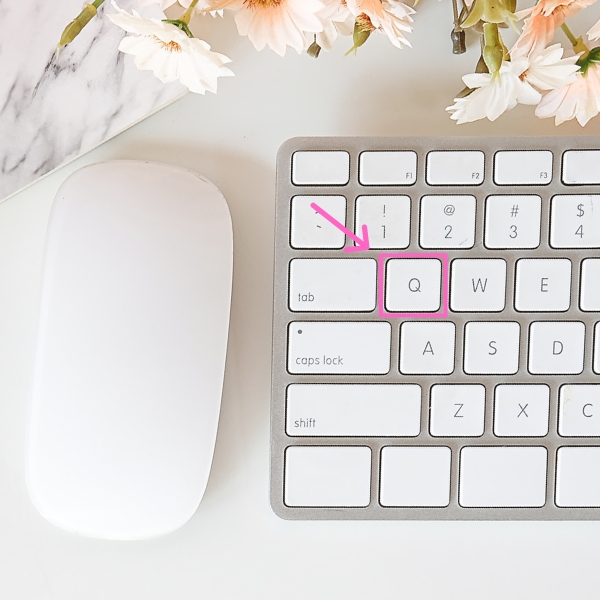
Super-easy, right?
I’m still trying to remember this one myself. I may need to put a label on the “Q” key on my keyboard to help until it becomes muscle memory.
If you voted in any of my Instagram polls last week, thank you! That really helps me so much. 🫶
If you didn’t, be sure to follow me on Instagram and watch for my stories. That’s where I post my polls as I develop this photo editing course. I’d love to have your input!
By the way, remember to watch this video training with more shortcuts in Lightroom. You’ll love it!
Happy editing,
Erika

Check Out the Newest Posts
Hey there photographer!

I'm Erika. I'm a private photo editor for wedding photographers and photo editing educator. Think of me as your techy friend who loves figuring out the shortcuts in Lightroom Classic so you don't have to.


Blog Categories


(Affiliate Code)


Online private photo editor based in Cleveland, Tennessee, serving wedding photographers worldwide.
Services
Color Correction
Style Matching
Lightroom Classic Retouching
Image Culling

Copyright © 2020-2026 Erika Swafford. All Rights Reserved
Created with Systeme.io