
SIMPLE SHORTCUTS & SECRETS
Photo Editing Made Easy
For busy wedding & portrait photographers so you can close that laptop sooner.
Organize Your Workspace in Lightroom Classic Using Solo Mode

If you’ve ever found yourself searching and endlessly scrolling in the Develop module just to get to the Tone Curve, Color Mixer or any of the other panels, you’re not alone. Lightroom Classic has a lot of panels—and keeping them all open can make finding the panel you’re looking for harder to do.
You need Solo Mode!
This little trick helps keep the panels easier to find and use—and is especially helpful if you’re editing on a smaller screen.
What Is Solo Mode in Lightroom Classic?
Solo Mode is a setting you can turn on that automatically collapses all other panels in a section (like the Develop module) when you click on a new one.
Instead of having all the Basic, Tone Curve, HSL, Detail, etc., panels open at once, Solo Mode keeps just one expanded at a time.
And it works in the Develop module and the Library Grid on both the right and left sides. (Separately, which is really great if you only want to use it for one or two parts.)
How to Turn On Solo Mode
To enable this, all you have to do is:
➜ Right-click on any panel header
➜ Click on "Solo Mode" from the dropdown menu
That’s it! You’ll now only see one open panel at a time, and Lightroom will auto-collapse the others when you switch.
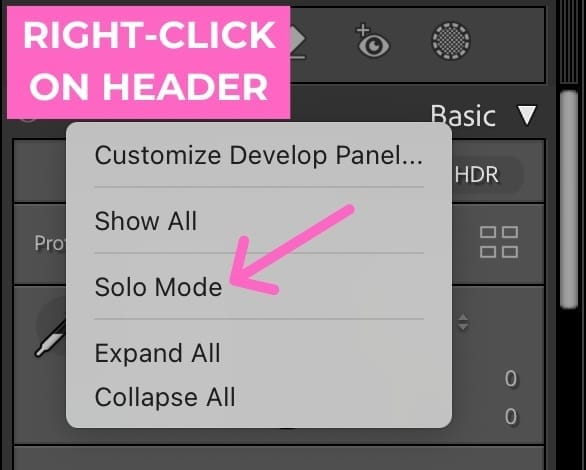
Pro tip: If you change your mind and want to turn it off, simply do the same steps above again.
How Solo Mode Improves Your Workflow
Using Solo Mode is super-useful because it helps you:
Avoid unnecessary scrolling (especially useful on a laptop or small monitor)
Stay focused on the panel you're working in
Keep your visual workspace clean and streamlined
No more losing time hunting for the Transform panel under a pile of other open panels. Lightroom Classic’s Solo Mode is a hidden gem that helps you simplify your editing space that makes your editing easier.
Try it out and see how much smoother (and less cluttered) your workflow feels.
Want more time-saving tips? Sign up for my free mini-workshop, Shoot to Edit Less—you’ll learn seven simple shooting strategies to speed up your editing.
Happy editing,
Erika

Check Out the Newest Posts
Hey there photographer!

I'm Erika. I'm a private photo editor for wedding photographers and photo editing educator. Think of me as your techy friend who loves figuring out the shortcuts in Lightroom Classic so you don't have to.


Blog Categories


(Affiliate Code)


Online private photo editor based in Cleveland, Tennessee, serving wedding photographers worldwide.
Services
Color Correction
Style Matching
Lightroom Classic Retouching
Image Culling

Copyright © 2020-2026 Erika Swafford. All Rights Reserved
Created with Systeme.io